








































New to KubeDB? Please start here.
MySQL Replication Mode Transform
This guide will give an overview on how KubeDB Ops Manager transforms the replication mode of a MySQL database — including promoting a standalone MySQL into a clustered topology and switching an existing cluster from one topology to another.
Two step-by-step guides build on this overview:
- MySQL Topology Mode Change — change the mode of an
existing database: standalone →
GroupReplication(Single-Primary or Multi-Primary) /InnoDBCluster/SemiSync, and changes between clustered topologies. - MySQL Remote/Read Only Replica Mode Transfer — transform a Remote Replica into a standalone or clustered database.
Supported Transformations
The target topology is selected with spec.replicationModeTransformation.targetMode, which accepts
GroupReplication (default), InnoDBCluster or SemiSync.
| From (source) | To GroupReplication | To InnoDBCluster | To SemiSync |
|---|---|---|---|
Standalone (no spec.topology) | ✅ | ✅ | ✅ |
| RemoteReplica | ✅ | ✅ | ✅ |
| GroupReplication | — | ✅ | ✅ |
| InnoDBCluster | ✅ | — | ❌ not supported yet |
| SemiSync | ❌ not supported yet | ❌ not supported yet | — |
Notes:
- Your data is preserved. Promotions and transformations never delete a volume. When a new
replica has to be seeded, it is seeded in place with MySQL’s
CLONE INSTANCE, which overwrites the data directory while thePersistentVolumeClaimis retained. - Transformations between clustered topologies happen in place.
GroupReplication⇄InnoDBClusterkeeps the running group and simply hands over management (adopting the group into an InnoDB Cluster, or releasing it back to plain Group Replication) — no teardown and no re-clone. - A standalone database is scaled up to at least 3 members when it is promoted, since a clustered topology needs a quorum.
spec.replicationModeTransformation.modeselects the Group Replication primary mode —Single-Primary(default) orMulti-Primary(multi-master, every member accepts writes). It applies to the group-based targets; it is ignored forSemiSync.- Replication Mode Transformation requires MySQL 8.4.2 or newer.
Before You Begin
- You should be familiar with the following
KubeDBconcepts:
How Replication Mode Transform Process Works
The following diagram shows how KubeDB Ops Manager transform replication mode of MySQL database components. Open the image in a new tab to see the enlarged version.
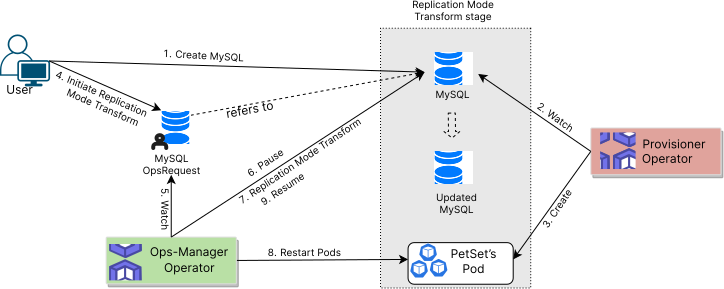
The Replication Mode Transform process consists of the following steps:
At first, a user creates a
MySQLCustom Resource (CR).KubeDBprovisioner operator watches theMySQLCR.When the operator finds a
MySQLCR, it creates requiredPetSetand related necessary stuff like secrets, services, etc.Then, in order to transform replication mode of the
MySQLdatabase the user creates aMySQLOpsRequestCR with desired information.KubeDBops-manager operator watches theMySQLOpsRequestCR.When it finds a
MySQLOpsRequestCR, it pauses theMySQLobject which is referred from theMySQLOpsRequest. So, theKubeDBprovisioner operator doesn’t perform any operations on theMySQLobject during the mode transform process.Then the
KubeDBops-request operator will transform replication mode to reach the expected replication mode defined in theMySQLOpsRequestCR.After the successful transformation of replication mode of the MySQL database, the
KubeDBops-request operator updates the new replication mode in theMySQLobject to reflect the updated state. After that, theKubeDBops-request operator resumes theMySQLobject so that theKubeDBprovisioner operator resumes its usual operations.
In the next docs, we are going to show a step-by-step guide on transform replication mode of various MySQL database using MySQLOpsRequest CRD.